Quick start
Install the plugin, pick a place, and hit Confirm. Your first level takes about five minutes, most of it download time.
Requirements
- Unreal Engine 5.6, 5.7 or 5.8 on Windows.
- An internet connection while generating. Finished levels work offline.
- A location in the United States. Elevation comes from USGS 3DEP, which covers the US only.
Install
- In the Epic Games Launcher, open Fab Library, find Terrain Sampler, and click Install to Engine.
- Open your project and go to Edit → Plugins. Search for “Terrain Sampler”, tick Enabled, and restart the editor.
- A Terrain Sampler menu now appears in the editor's main menu bar.
Generate your first level
- Open the tool. Choose Terrain Sampler → Open Terrain Sampler.
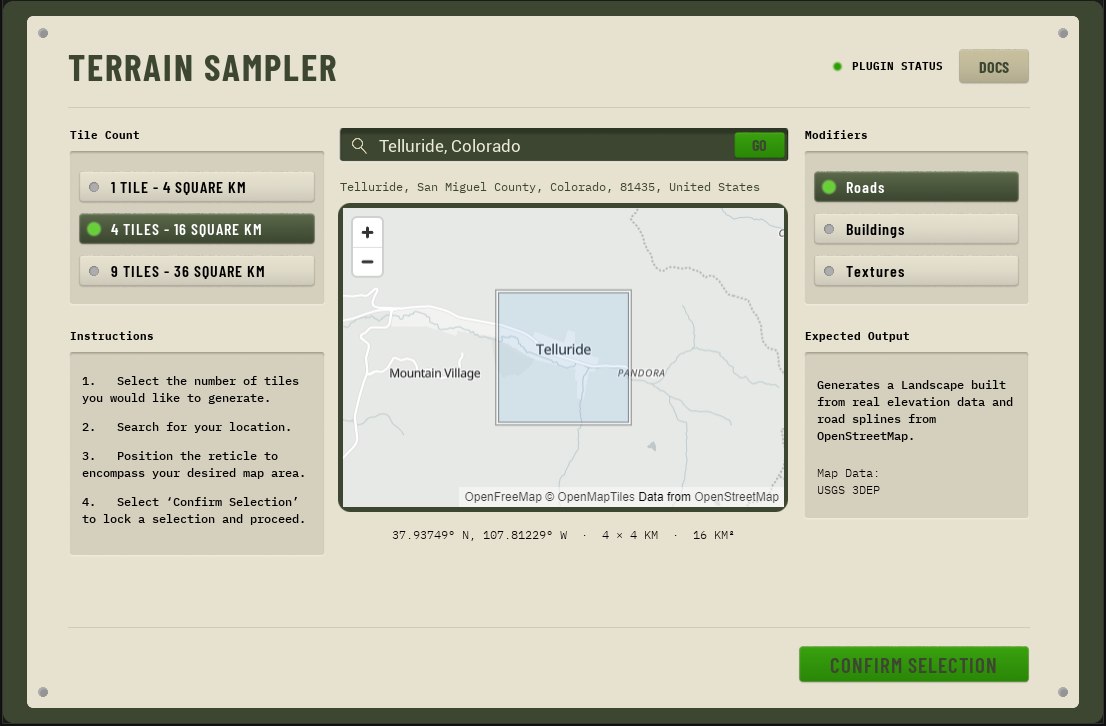
- Find your place. Type a location such as
Santa MonicaorMoab, Utahand press Go. The map flies there. You can also pan and zoom the map by hand. - Choose the footprint. Pick 1, 4 or 9 tiles. Each tile is 2 km on a side, so that's 4, 16 or 36 km². The reticle stays in the middle of the map, so drag the map until the area you want sits inside it. The readout under the map shows its center and size.
- Pick modifiers. Toggle Roads, Road markings and Textures. The Expected Output box tells you exactly what will be built.
- Confirm. Press Confirm Selection. A checklist shows each stage as it fetches and builds. When it finishes, the camera frames the new terrain.
- Play. Press Play. You spawn at a
PlayerStartin a real street lane. If the level already had a PlayerStart (the Basic template has one), Terrain Sampler offers to delete it, because Unreal picks one at random when there are several.
Save the level when it's done. The generated meshes are saved as they're built, but the landscape and actors live in your level until you save it.
What happens during generation
The progress screen runs these stages in order. Stages you switched off are skipped.
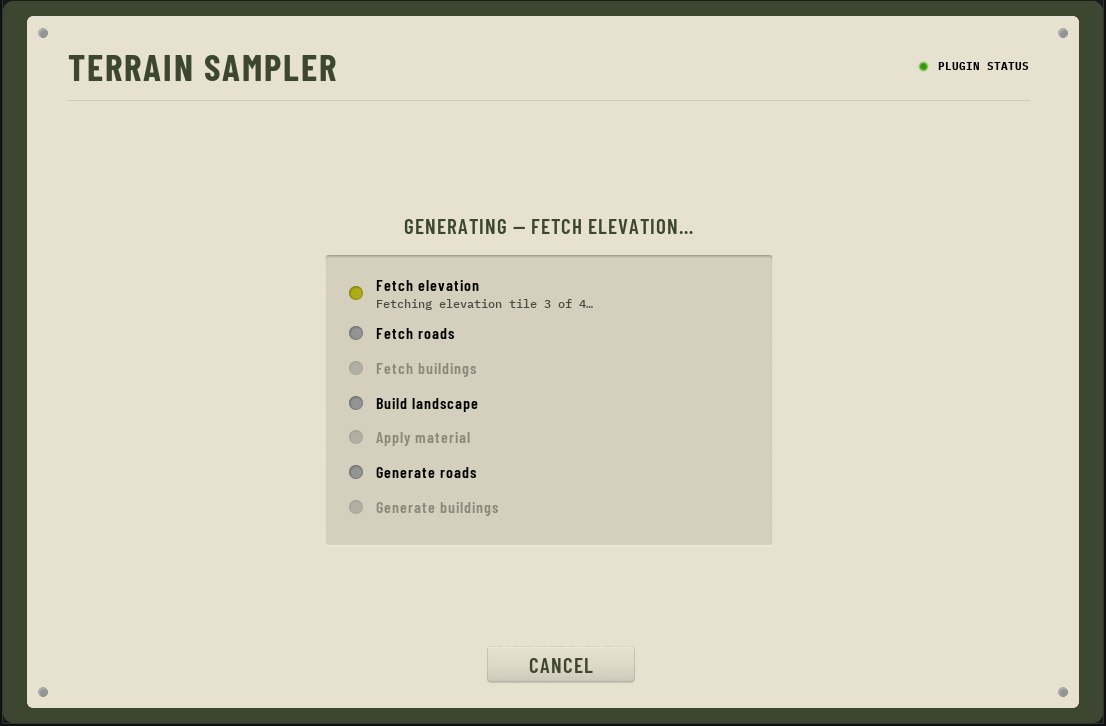
| Stage | What it does |
|---|---|
| Fetch elevation | Downloads USGS 3DEP heights for each tile. |
| Fetch roads | Downloads OpenStreetMap roads, crossings and stop lines for the footprint, plus measured lidar heights for its highways, ramps and bridges. |
| Build landscape | Creates one landscape per tile (1009 × 1009 vertices) and grades the roads into the terrain. |
| Apply material | Assigns the landscape material: asphalt, grass, rock and concrete. |
| Generate roads | Adds lane markings, curbs, sidewalks and parkways, bridge decks and retaining walls, plus the PlayerStart. |
If a stage fails, the progress screen shows why and offers Retry. Retry resumes from the failed stage and reuses everything already downloaded.
Generating again in the same level
If the level already holds Terrain Sampler terrain, you'll be asked what to do with it:
- Yes removes the existing generated terrain and builds the new one.
- No keeps it and adds the new terrain alongside.
- Cancel returns to the picker without generating.
Terrain Sampler only ever removes terrain it made itself. Anything you built by hand is left alone.
Tips
- Start with 1 tile to get a feel for a location, then go bigger.
- 9 tiles take the longest: 5 minutes or more in a dense city, and the editor can use over 20 GB of memory while it builds. The picker warns you when you choose 9 tiles. Big cities also take longer to cook than hills.
- The landscape is a normal
ALandscape. Sculpt and paint it with the usual tools. - Generate into an empty level such as File → New Level → Basic. An Open World level has its own landscape, which overlaps the generated one.
- For a few seconds after a run, the landscape can show a gray checkerboard while its material compiles. That's normal.
- The first time you reopen a generated level, Unreal builds its road meshes in the background, which takes seconds to a minute or so depending on size. After that they load from the cache.